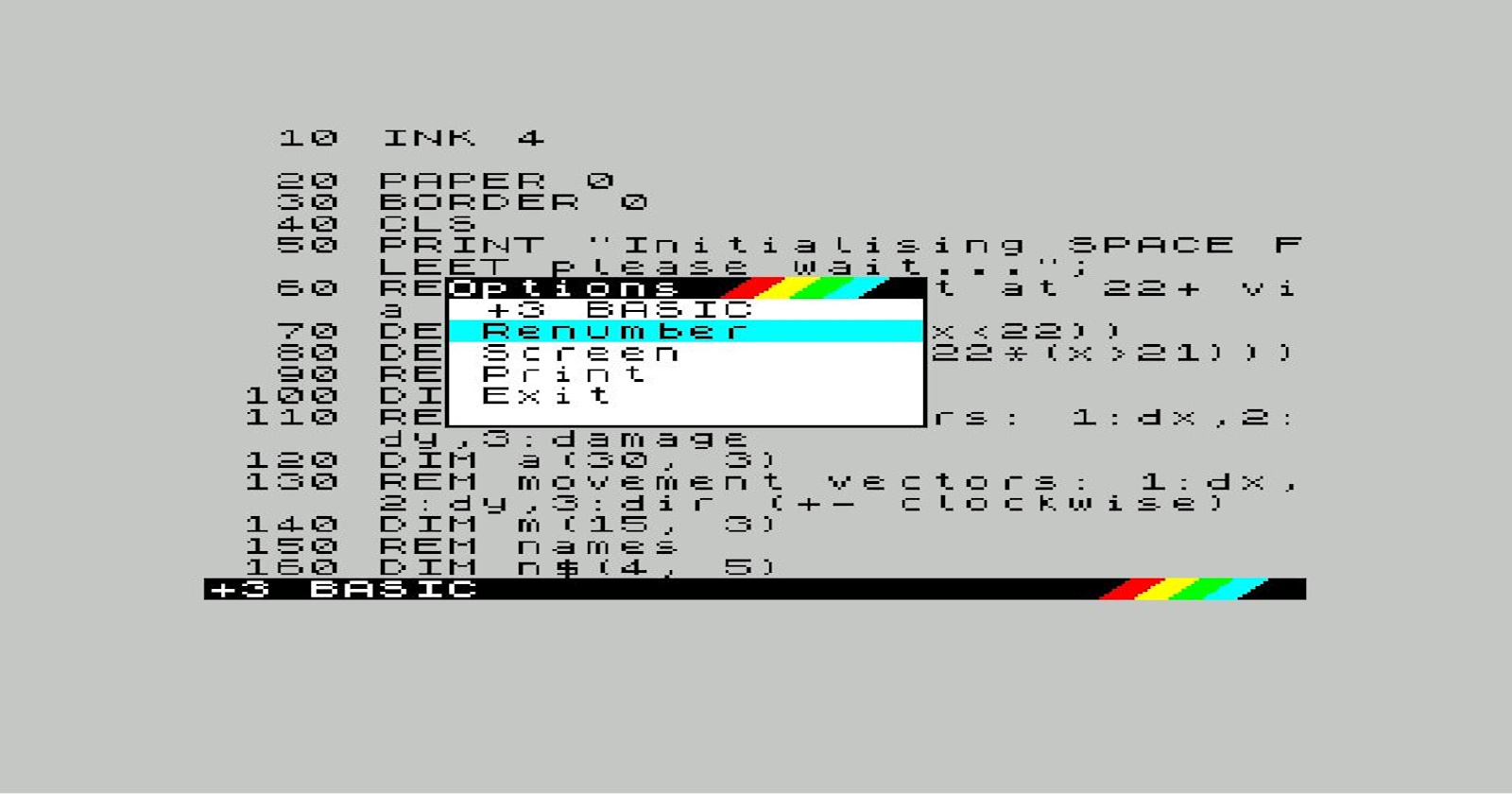
Since publishing my Sinclair BASIC wargame on itch.io I’ve made regular progress, getting it closer to the full rules of Space Fleet while trying to improve playability. I’ve been using Visual Studio Code as a text editor for its code highlighting and usability, then using bas2tap to convert to a .TAP file, then running and debugging in ZX Spin. This workflow has evolved slightly and may evolve further, but it’s a simple setup that doesn’t require any extra wiring. I have swapped text editors a few times without issue, for example.
One issue that has become more apparent as I’ve made regular updates is that Sinclair BASIC requires line numbers, and where I’ve tried to keep cohesive sections together I’ve eventually ran out of available numbers. I have ended up with a planet collision check in amongst the debug routines and ironically it feels like it has crash-landed there where it doesn’t belong. I was using the line number convention of increasing in 10s and had been wondering about idiomatic BASIC recently, so could squeeze in some 1s to get the code in the right place, but would then want to renumber to get back to 10s. I remembered that my +2A, which I got to replace my brother’s old 48k, had a renumber feature. There was that as a possible option, and there were a few suggested solutions when this was posed as a challenge.
I tried a couple of those solutions but they didn’t really work for whatever reason and I need a reliable solution if it’s going to become part of my workflow. I may try and create my own utility at some point along with a few other utility programs I can think of that might help the next project, but I don’t think it’s worth doing this now. I did manage to come up with a method that’s sympathetic to my current workflow and uses the +2A’s built-in +3 BASIC renumber feature. This might be useful to someone else, or may just be a reminder for myself, but it basically makes use of bas2tap, ZX Spin, and a utility called tap2bas which I casually wondered into existence or that’s what it felt like.
This is how you can renumber your ZX Spectrum 48k BASIC program, assuming it exists on your Windows
machine as main.bas (like mine). In fact I’m going to assume your setup is like mine, which is a
Windows machine with Java installed. Here are the steps.
-
Create a .TAP file using bas2tap e.g.
bas2tap.exe main.baswhich will createmain.tap -
Load ZX Spin
-
Select Tools -> Options -> Select
Amstrad +2A-> Okay -
Select File -> Load File -> Select
main.tap -
In the emulated ZX Spectrum, go to
+3 BASICif it takes you to the loader before you can do this, pressspacetwice to get back to the menu. -
You should see your listing. Press
shiftand1together to open the Options menu, then select Renumber. This may take a few seconds to complete. -
Select Recording -> Tape Recording -> Insert Tape For Saving -> enter
main_r.tapthen Save. -
Back in the emulated ZX Spectrum, type
save "main"thenenter."is achieved withcontrolandptogether. -
The non empty file
main_r.tapshould now exist (check file size, it should not be 0). -
Select Recording -> Tape Recording -> Eject Save Tape
-
-
Convert .TAP file to BASIC using tap2bas (see update for non Java method)
-
You need Java unfortunately so may need to install this. I have OpenJDK 11 installed, which is available here.
-
Download the .zip file from the latest tap2bas release, I used this one. Unzip it somewhere you can run Java from. I saved it to
C:\zxs_tap2basto avoid issues with spaces in folder paths. -
Copy your
main_r.tapfile into that location and runzxs_tap2bas_all_taps.bat. This should createmain_r.bas_. -
Save
main_r.bas_overmain.basin your project folder. -
Delete
main_r.tapandmain_r.bas_fromC:\zxs_tap2bas
-
And that’s it. Your main.bas file should now have been renumbered, and still be compatible with
48k machines despite using +3 BASIC for the renumbering. I may tidy up this workflow and perhaps
script some of it but these are the bare bones.
Update - there is a way of extracting the BASIC from a .tap file without Java (or tap2bas), using ZX-Blockeditor which is available here. You can simply open a .tap file and save as a .bas file.