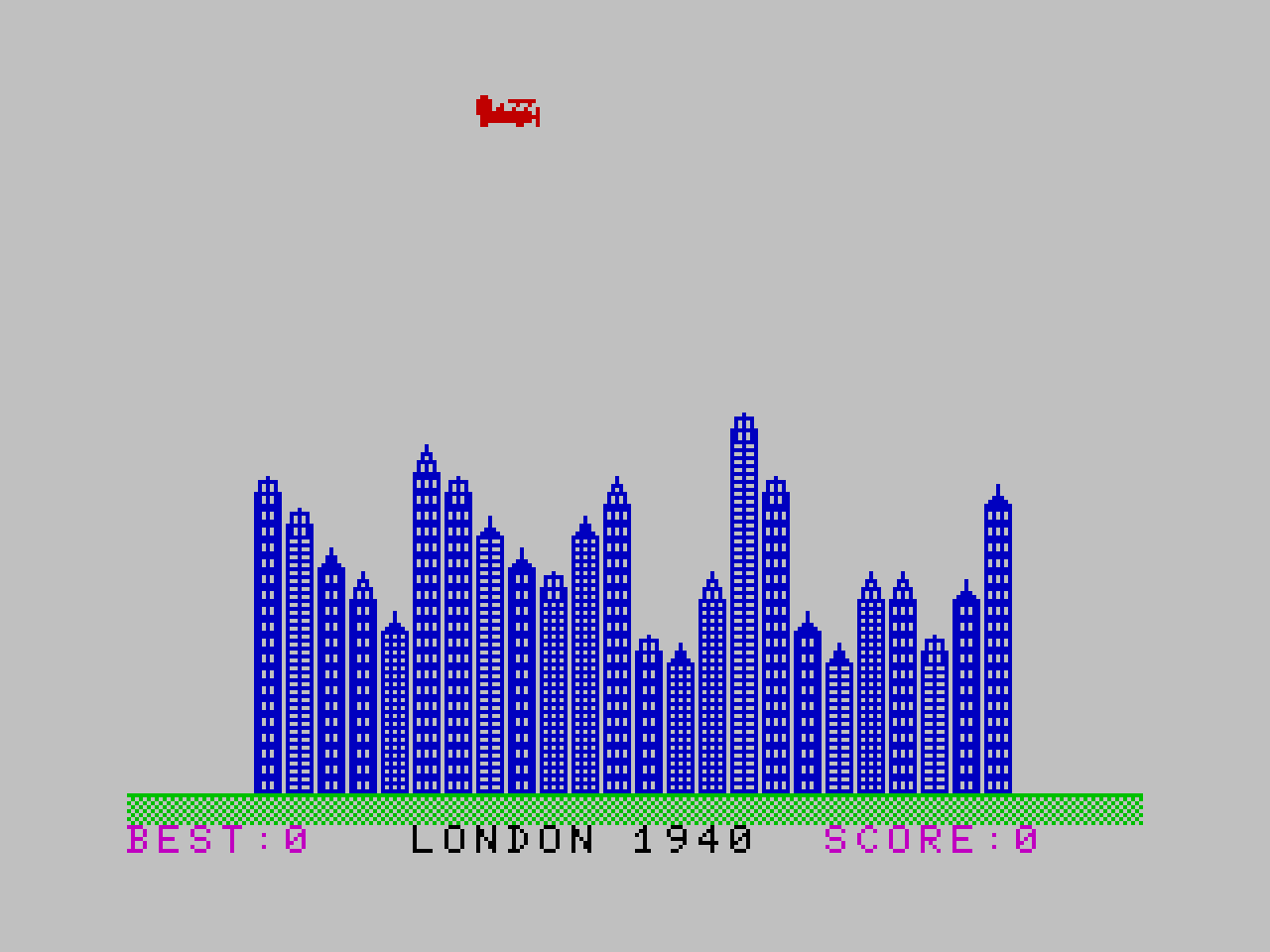
This is an implementation of the VIC-20 game Blitz in Sinclair BASIC using a modern toolchain. Some
bits are faithful and some are different, depending on what I could use, figure out, or wanted to
try in the time. .tap file for use with a ZX Spectrum emulator (tested with Fuse).
Download .tap file
A quick demo
Play it now
A few notes on what I did
Talk is cheap, show me the code.
I used a custom font (thanks
@jimblimey), pasting the defb values into a Z80 .asm
file and assembling with pasmo to create a .tap file. Deciding I only
needed upper case text meant I had 26 lower case characters to provide graphics while still being
able to use the nice and easy BASIC PRINT command.
You could use some sort of tool to design your UDGs graphically but I find I can visualise them
well enough if they’re defined using binary in the .asm file e.g.
defb %11111110 ; w - building body type 1
defb %11010110
defb %11010110
defb %11111110
defb %11111110
defb %11010110
defb %11010110
defb %11111110
Telling pasmo where in memory to assemble by adding this to the top of the file:
org 64000That means you can load the font from BASIC with the following:
CLEAR 63999
LOAD "" CODE
REM load font at 64000
POKE 23607,249
The BASIC .zxb file was also converted to a .tap file using
zmakebas, which gives you a few quality of life improvements
such as labels instead of line numbers. One nice thing about .tap files is that you can just
append your Z80 .tap file to your BASIC .tap file, which loads it using LOAD "" CODE and the
resulting .tap file just works. The .bat build file is therefore pretty straightforward:
.\tools\pasmo.exe --tap main.asm code.tap
.\tools\zmakebas -l -a @begin -o basic.tap main.zxb
type basic.tap code.tap > eigenblitz.tap
del basic.tap
del code.tap
This build pipeline could also be used to include machine code routines which can be called from
BASIC so long as we know the org location. Or even a game fully implemented in Z80 with the “BASIC
loader” (which is what I believe it’s usually called) loading the code then kicking it off. The
BASIC loader is also where you could add a loading screen. The rest of the BASIC file in our case is
the game implementation.
Sinclair BASIC implementation
Blitz is a simple game. The player’s plane moves from left to right on a screen filled with buildings, moving a row down each time it reaches the far side. Bombs can be dropped that fall at the same speed the plane flies, that destroy up to 5 storeys, and only 1 bomb can be dropped at a time. If the player collides with a building they crash and the game restarts. If the player destroys all buildings then they can land and the next level is loaded.
The idiomatic listing is as follows, generated by BasinC,
keeping in mind that a font file is loaded first, meaning that strings like "cde" are displayed as
a plane graphic.
  10 CLEAR 63999
  12 LOAD "" CODE
  14 REM load font at 64000
  16 POKE 23607,249
  18 REM score and top
  20 LET s=0
  22 LET b=0
  24 LET t=0
  26 REM main loop
  28 IF s>t THEN LET t=s
  30 GO SUB 150
  32 LET s=0
  34 LET b=0
  36 LET l=0
  38 LET g=0
  40 GO SUB 212
  42 PRINT #1;AT 1,0; INK 3;"BEST:";t;#1;AT 1,22; INK 3;"SCORE:";s
  44 REM construct buildings from city data
  46 LET d=260+l
  48 RESTORE d
  50 READ c$
  52 PRINT #1;AT 1,9; INK 0;c$;" ";1940+(g*10)+l
  54 FOR y=4 TO 27
  56 READ b$
  58 READ r$
  60 READ h
  62 LET h=h+(g*2)
  64 FOR x=21 TO 23-h STEP -1
  66 PRINT AT x,y; INK 1;b$
  68 BEEP 0.01,23-x
  70 NEXT x
  72 PRINT AT 22-h,y; INK 1;r$
  74 NEXT y
  76 REM bomber run
  78 LET bx=0
  80 LET by=0
  82 LET bp=0
  84 FOR x=0 TO 21
  86 FOR y=0 TO 28
  88 LET fx=50-x
  90 REM animate plane 1
  92 IF y=0 AND x>0 THEN PRINT AT x-1,y; INK 2;"mno";AT x,y;"pqr"
  94 IF y>0 THEN PRINT AT x,y; INK 2;"cde"
  96 REM animate bomb 1
  98 IF bp>0 AND bx=x THEN PRINT AT bx+1,by; INK 0;"h"
 100 IF bp>0 AND bx>x THEN PRINT AT bx,by; INK 0;"f";AT bx+1,by;"g"
 102 REM animate plane 2
 104 IF y=0 AND x>0 THEN PRINT AT x-1,y;"   ";AT x,y; INK 2;" ab"
 106 IF y>0 OR x=0 THEN PRINT AT x,y; INK 2;" ab"
 108 REM animate bomb 2
 110 IF bp>0 AND bx>x THEN PRINT AT bx,by; INK 0;" ";AT bx+1,by;"h"
 112 REM plane collision check
 114 IF ATTR (x,y+3)>56 THEN BEEP 0.01,1: GO SUB 240: GO TO 28
 116 REM bomb next line plus collision check
 118 IF bp>0 THEN LET bx=bx+1
 120 IF bp>0 AND bx<21 AND ATTR (bx+1,by)>56 THEN LET fx=23-bx: LET bp=bp-1: LET s=s+1: PRINT #1;AT 1,28; INK 3;s
 122 IF bp=1 THEN PRINT AT bx+1,by; PAPER 2; INK 6; FLASH 1;"v": LET b=b+1
 124 IF bx=21 OR bp=1 THEN PRINT AT bx-1,by; INK 0;" ";AT bx,by;" ": LET bp=0
 126 REM check for fire press
 128 IF bp=0 AND x<21 AND y>1 AND y<26 AND INKEY$=" " THEN LET fx=1: LET bx=x: LET by=y+2: LET bp=7
 130 BEEP 0.01,fx
 132 NEXT y
 134 IF x<21 THEN PRINT AT x,y;"   "
 136 NEXT x
 138 GO SUB 186
 140 LET l=l+2
 142 IF l>8 THEN LET l=0: LET g=g+1
 144 CLS
 146 GO TO 40
 148 REM start screen routing
 150 CLS
 152 PRINT AT 2,11; INK 2;"EIGENBLITZ"
 154 PRINT AT 4,5; INK 3;"THE OBJECT OF THE GAME"
 156 PRINT AT 5,5; INK 3;"IS TO FLATTEN THE CITY"
 158 PRINT AT 6,5; INK 3;"SO THAT  YOU  CAN LAND"
 160 PRINT AT 7,5; INK 3;"YOUR AEROPLANE  ON THE"
 162 PRINT AT 8,5; INK 3;"GROUND.   YOU  CONTROL"
 164 PRINT AT 9,5; INK 3;"THE DROPPING  OF BOMBS"
 166 PRINT AT 10,5; INK 3;"BY  PRESSING "; PAPER 0; INK 7;"SPACE"; PAPER 7; INK 3;"."
 168 PRINT AT 12,5; PAPER 2; INK 7;"PRESS ANY KEY TO START"
 170 PRINT AT 15,9;"BEST SCORE ";t
 172 PRINT AT 17,9; INK 1;"LAST SCORE ";s-b
 174 PRINT AT 18,9; INK 1;"PLUS BONUS ";b
 176 PRINT AT 19,14;"TOTAL ";s
 178 PAUSE 0
 180 CLS
 182 RETURN
 184 REM man waving routine
 186 PRINT AT 21,29; INK 2;"ab"
 188 FOR n=1 TO 5
 190 PRINT AT 21,26; INK 0;"s"
 192 PAUSE 10
 194 PRINT AT 21,26; INK 0;"t"
 196 PAUSE 10
 198 PRINT AT 21,26; INK 0;"u"
 200 PAUSE 10
 202 PRINT AT 21,26; INK 0;"t"
 204 PAUSE 10
 206 NEXT n
 208 RETURN
 210 REM plan flies off routine, careful to leave black ink after plain
 212 PRINT #1;AT 0,0; INK 4;"llllllllllllllllllllllllllllllll"
 214 PRINT AT 21,0; INK 2;"ab"
 216 PRINT AT 20,0; INK 2;"mno";AT 21,0;"pqr"
 218 LET x=20
 220 FOR y=0 TO 27
 222 PRINT AT x,y;" ";AT x,y+1; INK 2;"ab"
 224 PRINT AT x+1,y;"   "
 226 IF x=0 THEN PRINT AT x,y;" ";AT x,y+1; INK 2;"cde"
 228 IF x>0 THEN LET x=x-1: PRINT AT x,y;" ";AT x,y+1; INK 2;"mno";AT x+1,y; INK 0;" ";AT x+1,y+1; INK 2;"pqr"
 230 BEEP 0.01,50-x
 232 NEXT y
 234 PRINT AT 0,28;"    "
 236 RETURN
 238 REM plane crashes routine
 240 LET ax=x
 242 LET bx=x
 244 PRINT AT ax-1,y+1;" ";AT ax,y+1; INK 2;"i";AT bx-1,y+2;" ";AT bx,y+2;"j"
 246 LET x=x+1
 248 IF ATTR (ax+1,y+1)=56 THEN LET ax=ax+1
 250 IF ATTR (bx+1,y+2)=56 THEN LET bx=bx+1
 252 IF x>22 THEN RETURN
 254 BEEP 0.01,50-x
 256 GO TO 244
 258 REM city data
 260 DATA "LONDON","w","|",10,"x","|",9,"w","}",8,"w","~",7,"z","{",6,"y","~",11,"y","|",10,"x","{",9,"w","{",8,"z","|",7,"z","}",9,"y","~",10,"w","|",5,"z","}",5,"z","~",7,"x","|",12,"y","|",10,"w","{",6,"x","}",5,"z","~",7,"y","~",7,"x","|",5,"w","{",7,"y","{",10
 262 DATA "BRISTOL","x","|",5,"w","{",7,"y","{",10,"y","~",10,"w","{",6,"x","}",5,"z","~",7,"w","|",10,"x","|",9,"w","}",8,"w","~",7,"z","{",6,"y","~",11,"y","|",10,"x","{",9,"w","{",8,"z","|",7,"z","}",9,"y","~",7,"w","|",5,"z","}",5,"z","~",7,"x","|",12,"y","|",10
 264 DATA "GLASGOW","z","~",7,"x","|",12,"y","|",10,"w","{",6,"x","}",5,"z","~",7,"w","|",10,"x","|",9,"w","}",8,"w","~",7,"z","{",6,"y","~",11,"y","|",10,"x","{",9,"w","{",8,"z","|",7,"z","}",9,"y","~",7,"x","|",5,"w","{",7,"y","{",10,"y","~",10,"w","|",5,"z","}",5
 266 DATA "CARDIFF","x","|",5,"w","{",7,"y","{",10,"y","~",10,"w","|",5,"z","}",5,"z","~",7,"x","|",12,"y","|",10,"w","{",6,"x","}",5,"z","~",7,"w","|",10,"x","|",9,"w","}",8,"w","~",7,"z","{",6,"y","~",11,"y","|",10,"x","{",9,"w","{",8,"z","|",7,"z","}",9,"y","~",7
 268 DATA "BELFAST","y","|",10,"x","{",9,"w","{",8,"z","|",7,"z","}",9,"y","~",7,"w","|",5,"z","}",5,"z","~",7,"x","|",12,"y","|",10,"x","|",5,"w","{",7,"y","{",10,"y","~",10,"w","{",6,"x","}",5,"z","~",7,"w","|",10,"x","|",9,"w","}",8,"w","~",7,"z","{",6,"y","~",11